a field note
How to create a family portrait from separate photos
2026-11-16
The product page tells you that a family portrait can start from separate photos. This note is the practical version of that sentence: which pictures to ask for, which ones to throw out, how the who-is-who step actually feels, and when to stop and print. It assumes you are on a phone, you are collecting pictures from more than one household, and you would like the faces to survive a close look. The page to start from, once the photos are in a folder, is create a family portrait from separate photos. Read this first if you are still deciding what to send people.
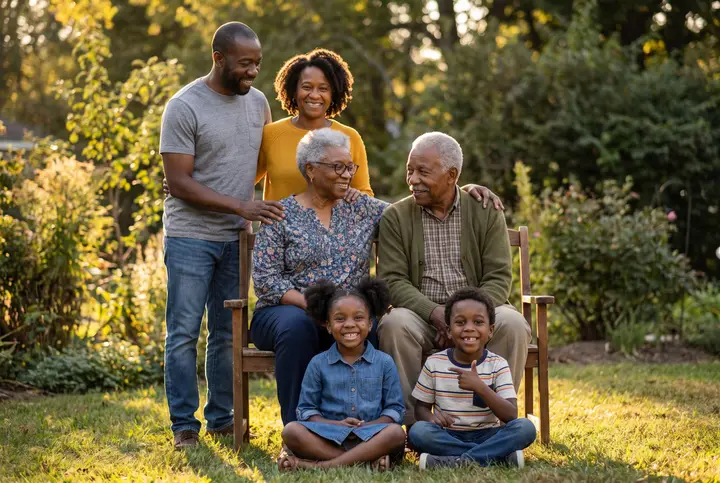
Examples on this page were made for FamFrame. The families are made up.
Choose reference photos and make the portrait
- Ask for one clear, well-lit photo per person. Face large enough to see, looking toward the camera, at least a head-and-shoulders crop and ideally waist-up. Ordinary window light is enough. No heavy filter.
- Reject the pictures that hide the face. Sunglasses, a hand across the mouth, an extreme close selfie, a tiny face in a crowd, and strong backlight are the usual failures. A group photo is fine only when each face you need is already clear.
- Confirm who is who, then the details a photo cannot show. FamFrame groups faces. You fix the groups. Age, and height for adults, keep a child from being drawn as tall as a parent.
- Pick one photo shoot and check the likeness. Choose the set for how you will use the print. Look at every face on the watermarked preview. If one person is wrong, replace that photo rather than regenerating the same set.
- Print a small copy only after the faces are right. FamFrame does not print for you. A single modest print is the test. The clean, full-size file is a separate decision, explained on the pricing page.
What to ask for
Send a boring request. One recent photo, facing the camera, in a normally lit room, no need to dress up. People comply with a small task. They postpone a creative one.
Old prints are allowed when they are the picture you have. Photograph the print straight on, without glare. If the face is soft, the portrait will be soft in that face, and you should expect to look twice.
Choosing the shoot
The shoot is a set, not a caption. Window light, a Sunday table, a meadow, a library, a holiday room: open the list and pick the one the print should feel like. You are not naming a style word on top of a place.
There is one quality. You are not choosing a tier. You are choosing whether the faces, in that set, look like the people.
Likeness, then paper
The watermarked preview is the review copy. Pass it to the person who is picky about their own face. If they do not recognize themselves, change their photo. Do not argue with the preview.
When you print, start small. A horizontal photo suits a 6×4. Cropping for another shape happens in the tool you print from. None of that is a reason to skip the likeness check.
Questions
Can I make a family photo from separate photos?
Yes. Each person can start from their own photo, taken in a different place or even a different year. You do not need a picture where everyone is already standing together.
Do the reference photos need to match each other’s clothes?
No. The shoot dresses the family for the set. Matching outfits in the uploads are unnecessary, and usually impossible.
What if I only have a group photo?
Use it if every face you need is large and clear. Otherwise find a closer picture of the person who is hard to see.
Can I try it for free?
Yes. New users get 3 free frames with a watermark, and no credit card is needed. You sign up only when you tap Create frame, with a 6-digit code sent to your email.
Is it private?
Your photos stay private. Use pictures you have the right to use, especially of children, and the privacy policy explains how long files are kept.
Ready when you are. The photos you already have are enough.
Create frame